Finance
Dunning
Dunning is the process of sending payment reminders to members who have outstanding overdue invoices. Omoplata supports both automatic and manual dunning with escalating reminder levels, helping you recover unpaid fees while maintaining a professional relationship with your members.
How dunning works
When an invoice passes its due date without being paid, it enters the overdue status. The dunning system identifies these overdue invoices and either sends reminders automatically or allows you to send them manually.
Reminder timing
The timing of reminders follows two rules:
| Rule | Description |
|---|---|
| First reminder | sent a configurable number of days after the invoice due date (default: 14 days). |
| Subsequent reminders | sent after a configurable interval from when the previous reminder was actually sent (default: 14 days). |
The interval is measured from the actual send date of the previous reminder, not from the invoice due date. This means if a reminder is sent a few days late, the next one still follows the full interval.
For example, with the default 14-day intervals:
- Invoice due date: January 1
- First reminder due: January 15 (14 days after due date)
- If the first reminder is sent on January 20, the second reminder is due February 3 (14 days after the first was sent)
Reminder levels
Omoplata uses four escalating dunning levels. Each level can have its own late fee and delivery method:
| Level | Name | Default fee | Default delivery |
|---|---|---|---|
| 1 | Payment reminder | None | |
| 2 | First formal reminder | 5.00 | |
| 3 | Second formal reminder | 10.00 | Email + postal letter |
| 4 | Final reminder | 15.00 | Email + registered mail |
The reminder level is determined by the highest step among all invoices included in a single reminder. Each invoice tracks its own step count independently, so if a member has multiple overdue invoices at different stages, the overall reminder level reflects the most advanced one.
Late fees
Late fees are added on top of the original invoice amount. They are configurable per level and can be set to zero if you prefer not to charge fees for early reminders.
Automatic vs manual dunning
Automatic dunning
When automatic dunning is enabled, Omoplata checks for overdue invoices daily and sends reminders based on your configured timing rules. To enable it, turn on the auto dunning toggle in your dunning settings.
Each day, the automatic process:
- Finds all invoices in overdue status.
- Checks whether enough time has passed since the last reminder (or since the due date for the first reminder).
- Groups invoices by payer.
- Sends reminders at the appropriate level.
- Records the delivery status and updates each invoice's reminder step.
Manual dunning
Even with automatic dunning enabled, you can send reminders manually at any time from the dunning page. This is useful when you want to follow up with a specific member immediately or when you want more control over the process.
To send a manual reminder:
- Go to Finance > Dunning.
- Find the member with overdue invoices.
- Select the invoices to include in the reminder.
- Click send.
The dunning dashboard
The dunning page at Finance > Dunning shows all members who have overdue invoices, organized by person. For each member you can see:
- Their name and contact information.
- The number and total amount of overdue invoices.
- The due dates of their oldest unpaid invoices.
- The history of reminders that have already been sent, including delivery status.
Filtering
The dunning list supports these filter views, among others:
| Filter | Description |
|---|---|
| All | every member with overdue invoices. |
| No reminder | members who have not received any reminder yet. |
| Sent | members who have already been sent at least one reminder. |
| Created, not sent | payers whose newest reminder was created but never went out. While there are any, a tile at the top of the page counts them. |
| Handed to collection | payers whose debt is with a collection agency. They are not in any other view (see below). |
You can also search by member name, email, or invoice ID.
Delivery and tracking
Each reminder send is tracked with a delivery status:
| Status | Meaning |
|---|---|
| Pending | Reminder has been created but not yet dispatched. |
| Sent | Successfully dispatched (email sent or letter queued). |
| Delivered | Delivery confirmed (for example, email read receipt received). |
| Failed | Delivery failed (for example, email bounced or invalid address). |
Resending a reminder
Sometimes a reminder has to go out again at the same level: the email bounced, or the member has given you a corrected address. Click Resend same level in the payer's dunning panel and choose the Delivery channels for this send:
- The channels the reminder was first sent with are ticked, as far as they can still reach the payer.
- Letter and Registered Mail can be ticked as soon as an address is on file, even if the reminder first went out by email only. This is how a reminder that was created while you had no address can still be sent by post later.
- A channel that cannot reach the payer (no email address, no postal address) is greyed out and marked not deliverable.
Click Resend and confirm. The member receives the same reminder again through the channels you picked; the dunning level does not change. Postal deliveries cost postage. The reminder keeps its original channels; the delivery history shows how each send went out.
While the payer's debt is with a collection agency, reminders cannot be resent.
Configuring dunning
All dunning behavior is controlled through settings. The key settings are:
| Setting | Description | Default |
|---|---|---|
| First reminder days | Days after invoice due date to send the first reminder | 14 |
| Reminder interval | Days between subsequent reminders | 14 |
| Level 1 fee | Late fee for payment reminder level | No fee |
| Level 2 fee | Late fee for first formal reminder | 5.00 |
| Level 3 fee | Late fee for second formal reminder | 10.00 |
| Level 4 fee | Late fee for final reminder | 15.00 |
| Level 1-4 delivery | Delivery methods per level | Email, Email, Email + post, Email + registered mail |
| Auto dunning | Whether automatic daily reminders are sent | Off |
Legal considerations
If your club is based in Germany, be aware that formal payment reminders (Mahnungen) have legal requirements. A valid reminder should include the debtor's name and address, invoice reference and date, amount due, original due date, a new payment deadline, your bank details (IBAN), and a note about consequences of non-payment. For final reminders before escalating to a collection agency, sending via registered mail (Einschreiben) provides the strongest proof of delivery.
Escalation path
If dunning does not result in payment, the typical escalation path is:
- Level 1 -- friendly payment reminder via email. No fee.
- Level 2 -- first formal reminder with a small late fee.
- Level 3 -- second formal reminder sent both by email and postal letter. Higher fee.
- Level 4 -- final reminder sent by email and registered mail. Highest fee. This step establishes legal proof of notification.
- Collection agency -- if the final reminder goes unanswered, you may hand the case to a collection agency (Inkasso). At least one formal reminder must have been sent and its deadline must have passed before escalating.
After reaching the final dunning level, you can mark the invoice as uncollectible if you decide not to pursue further collection, or as void to write it off entirely.
Handing a case to a collection agency
Once you decide to escalate, Omoplata assembles the complete hand-over package as a ZIP file. You will find it in the payer's dunning detail panel, as soon as a formal reminder has actually reached the member.
What is always included
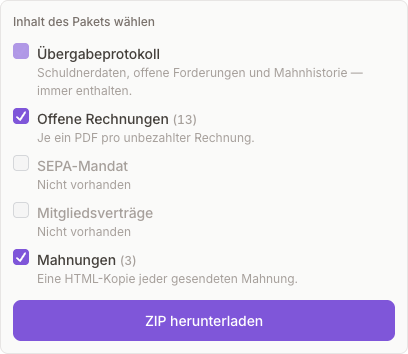
The hand-over record (00_Inkasso_Deckblatt.pdf) is the package itself and is always written. It holds the debtor's details, the open claims with their invoice numbers, the dunning history and the failed payment attempts including the bank return reasons.
What you choose
Everything else is supporting evidence you tick or untick per hand-over:
| Group | Contents in the ZIP |
|---|---|
| Invoices | One invoice PDF per open claim, under Rechnungen/. |
| SEPA mandate | The signed mandate as proof of the payment arrangement. |
| Membership contracts | The signed contract; with several members, one file each under Vertraege/. |
| Reminders | The stored wording of every reminder that was actually sent. |
Groups that have files are pre-ticked; empty groups are greyed out and cannot be selected. The list of attachments on the cover sheet is built from the files that were really packed -- so it can never promise the agency something you deselected.
Always in German
The whole package -- cover sheet and invoice PDFs -- is produced in German regardless of your club's language setting, because it is read by a German collection agency.
Recording the hand-over
Once you have sent the package to the agency, record it in Omoplata so the debt stops counting as yours to chase. In the payer's dunning panel, click Record hand-over to collection agency. The form shows how many invoices go over and the total, including any damages claim for the remaining term. Fill in:
| Field | |
|---|---|
| Collection agency | the agency's name (optional). |
| Agency file number | the agency's reference for the case (optional). |
| Handed over on | the date of the hand-over. It can lie in the past, if you sent the package before recording it. |
Click Mark as handed over and confirm. Omoplata then:
- moves the payer's due, unpaid invoices to the status Handed to collection. A partly paid invoice goes over for the amount still open.
- sets the memberships this payer funds that are still running to payment default, so billing for them stops.
- takes the payer out of dunning: no automatic or manual reminders, no resends, and no further termination or Restfälligstellung from the panel.
- removes the amount from the overdue total. It is shown on its own instead, as With collection agency on the dunning page and With agency on the invoices page.
The member is not notified by Omoplata; the agency contacts them. A payer can have only one open hand-over at a time.
While the debt is with the agency
The members list shows Handed to collection in place of the membership status, and has a Handed to collection view. On the member's Billing tab, the payment behaviour card shows the date, agency and amount. In dunning, the payer is in the Handed to collection view only, where the panel shows the hand-over: date, agency, file number, invoices, damages claim and who recorded it.
Handed-over invoices are still owed, but they are never debited and a late bank return does not move them. If the member pays you directly, you can still match the bank transfer to the invoice. The member cannot be deleted while the hand-over is open, and Mark solved and reactivating the membership are blocked until you close it.
Closing the hand-over
When the case is over, close it from the same panel:
| Button | When to use it | What happens |
|---|---|---|
| Collected | the agency has recovered the debt. | The handed-over invoices are marked paid and the damages claim it carried is recovered. The memberships stay in payment default; use Mark solved if you want the member back. |
| Take back | the debt was handed over by mistake. | Each invoice goes back to the status it had before and returns to dunning. The memberships get their previous status back. |
Every hand-over and its closing is recorded in the member's activity history.
Payment health
Omoplata reads how a payer pays from their payment history, so you can spot a problem before it becomes a dunning case. Nothing is changed automatically: the figures are there to support your decision.
The payment behaviour card
On a member's Billing tab, the Payment behaviour card shows the payer's standing (for a child, the parent who pays) as soon as there is something to show:
| Figure | What it shows |
|---|---|
| Months bounced | in how many of the last 12 billed months a debit came back, and how many returns there were in total. |
| Last successful payment | the date, and whether it is confirmed on the bank statement or only assumed because no return arrived. |
| Open amount | what the payer still owes, after part payments, and how many membership fees are unpaid. |
| Latest return code | the most recent bank return code with its reason. |
The card names one of these standings:
| Standing | When |
|---|---|
| Pays regularly | none of the rules below apply. |
| Irregular payer | debits bounced in at least 2 different months within the last 12 months. |
| Payment default suggested | at least 2 membership fees that have fallen due are unpaid, or the payer reversed a debit (MD06) and the invoice is still owed. A link takes you to dunning, where you decide whether to mark the payment default. |
| Payment default | a membership this payer funds is in payment default. |
| Handed to collection | the payer has an open hand-over to a collection agency. |
Returns caused by wrong data on the club's side (for example a wrong IBAN or a missing mandate) never count against the payer.
Below the figures, Payment status history lists every change into or out of payment default: when, what changed, what the payments looked like at that moment, and who made the change.
Finding payers with payment issues
The members list has a Payment issues view: everyone who is an irregular payer or has a payment default suggested, together with the members whose memberships they pay for.