Shop
Punch cards
A punch card is a paid training allowance: a 10-class card, a 5-class block, a monthly card. It is sold in the shop like any other product, spent at check-in, and works without a membership -- a walk-in pays at the desk and trains the same evening.
1. Create the card product
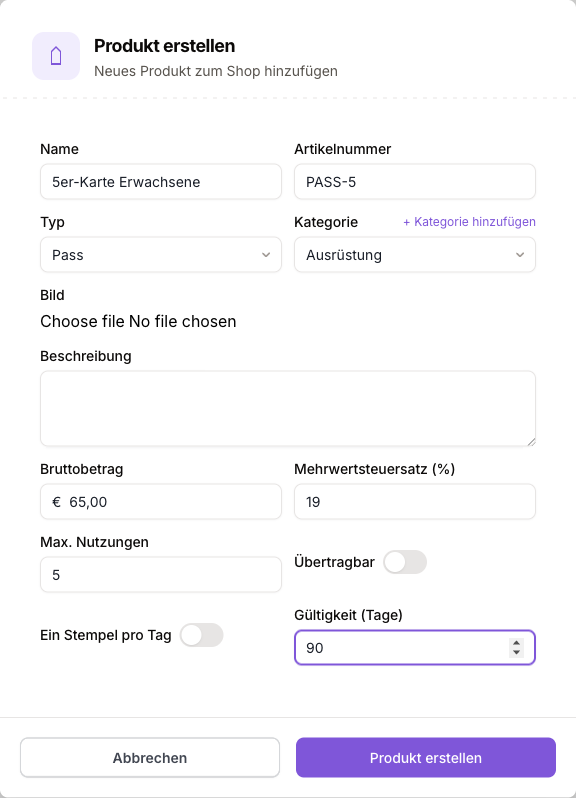
Go to Shop > Products and click Create product. Set Type to Pass -- the card fields appear.
| Field | What it does |
|---|---|
| Name | Appears on the member's card later (e.g. "10-class card adults"). |
| Gross amount | Sale price including VAT. |
| Max. uses | Number of punches. Leave empty for unlimited visits within the validity (a monthly card). |
| Validity (days) | Counted from the day of sale. The last day still counts: a 90-day card sold on 31 August is valid through 28 November. Leave empty for no expiry. |
| Transferable | The card may be used within the family (children and responsibles). It is not a bearer card for anyone to present. |
| One punch per day | One punch covers all of one person's classes on the same day. BJJ at 18:00 plus open mat at 19:30 costs one punch. |
One limit is mandatory
A card product needs max. uses, a validity, or both. A card with neither would never run out -- the form rejects it.
2. Sell the card
On the same page: Create sale.
Pick the customer
Search for an existing member -- or use + New customer for a walk-in: first name, last name, email, date of birth. The customer is created as a member without a membership.
Add the product
Select the card product. Quantity 2 mints two cards, not one card with twice the balance.
Choose the payment method and finish
Cash or direct debit. Once the sale is recorded the card is active immediately -- the customer can train right away.
Email and date of birth
The email address is required: it is how the customer signs in to the app (a login code is emailed to them). The date of birth is optional, but it determines the customer's age group -- without it, no age-group rule can be enforced for them.
With direct debit the card is active immediately as well. If the payment later fails, the cards from that sale are revoked automatically; if the invoice is repaired, they come back. A card revoked by hand stays revoked.
3. Redeem a punch
The member scans the club's QR code with the app on arrival. The app checks them into the running class and spends a punch in the process.
| Rule | Behaviour |
|---|---|
| A membership always wins | Anyone with an active membership spends no punch. A leftover card is never silently drained. |
| Order | The card that expires first is punched first. Cards without an expiry go last. |
| One punch per day | Only the first class of the day costs a punch. Further classes that day are free. |
| No coverage, no check-in | If the card is exhausted or expired and nothing else covers the visit, the check-in is refused. The member is told why and the attempt is recorded. |
| Valid for every class | A card covers any class. The age-group rule still applies. |
| An assignment overrides | Someone the club assigned to a class gets in even without a card. |
Attendance added later in the register counts against the date of the class: backfilling last month's session spends the card that was valid back then.
4. Manage cards
The member profile has a Cards tab with one row per card -- punch dots, status, validity and the "transferable" and "one punch per day" tags.
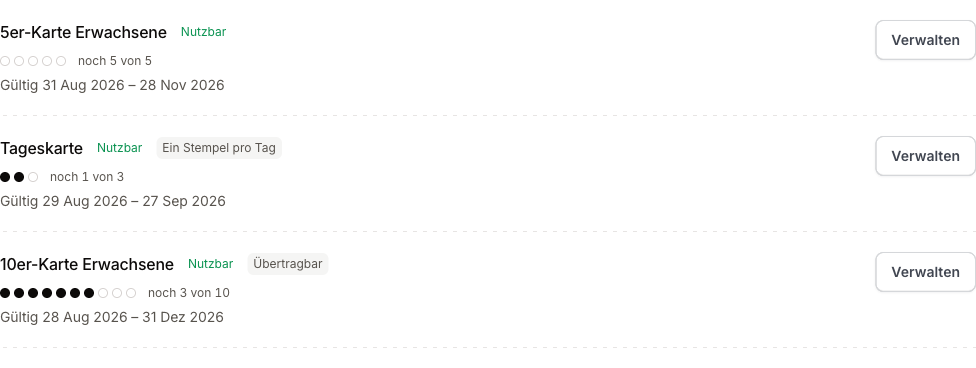
| Action | Where | Effect |
|---|---|---|
| Grant card | Button above the list | A free card without a sale -- a goodwill gesture or a trial card. |
| Deduct punch | Manage | Records a punch by hand (cash at the door, a correction). |
| Extend | Manage | Sets a new expiry date. Expired cards stay visible and can be extended at any time. |
| Revoke | Manage | Voids the card. It no longer counts as coverage. |
| History | Manage | Every punch with its date. Manual punches can be taken back individually here. |
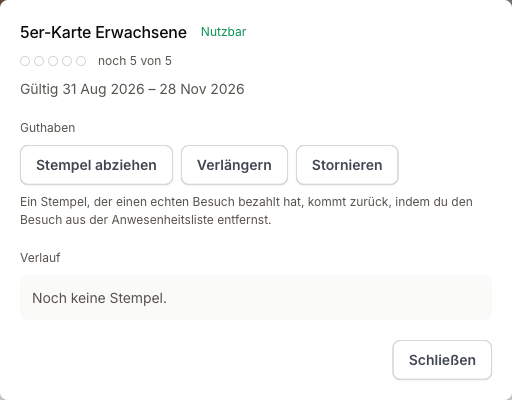
Giving a punch back
A punch that paid for a real visit comes back by removing that attendance from the class register -- not through the manage dialog. On a one-punch-per-day card with two visits the same day the punch is moved to the remaining visit; only removing the day's last visit refunds it.
Card customers hold no membership, so no status view in the member list will find them. That is what the saved Card holders view is for; it appears as soon as at least one usable card exists.
5. What the member sees
In the app the cards sit on the dashboard under Punch cards: name, remaining balance, punch dots and expiry date. Tapping a card opens its detail with the punch history.
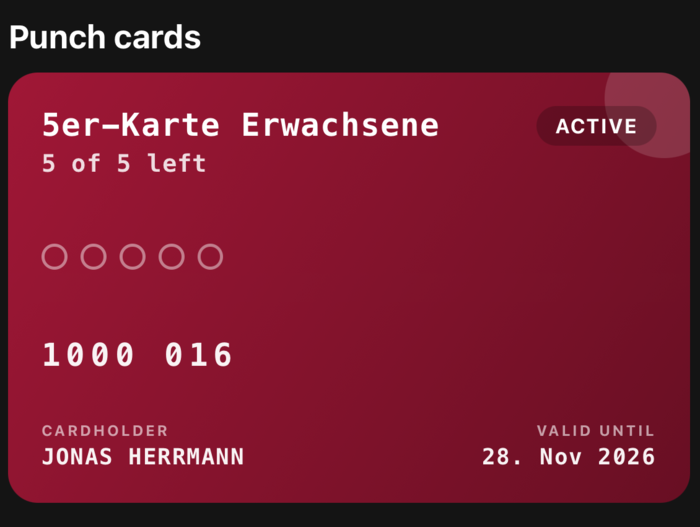
After a successful check-in the app shows which card paid and how many classes are left. After a refused one it names the reason (exhausted or expired) so the member can top up at the desk.
Limits
- A card covers every class; it cannot be restricted to one discipline or class.
- Cards are sold at the club; there is no self-purchase in the app.
- There is no automatic notification for a low balance or an approaching expiry.
- Card customers do not count as active members in analytics -- that figure is tied to memberships.