Plans & billing
Special prices
Special prices are named discount categories you can apply to regular prices -- such as a student discount, a rate for apprentices, or an early-bird rate. The key idea: a member on a special price still behaves like a normal member (a student is treated as an adult for all behavioral rules) but pays a reduced amount. Discounts are therefore modeled as a pricing adjustment, not as a separate member demographic.
Navigate to Settings > Special prices to view your special price categories.
What a special price is
A special price is a category, not a fixed amount. It gives the discount a name -- for example "Student discount" or "Emergency services" -- which you then assign to specific prices on a plan. The actual reduced amount is set on the price itself, not on this page.
Typical examples for a martial arts club:
| Special price | Description |
|---|---|
| Student discount | A reduced monthly rate for members with a valid student ID. |
| Apprentices | A lower rate for members in vocational training. |
| Police and fire service | A preferred rate for members of the emergency services. |
| Federation members | A preferred rate for members of a partner club or association. |
The overview page
The page lists every special price category defined in your club by name. It acts as a catalog of the discounts you can use in your plan pricing. The actual assignment -- which price gets which special price and how much it's reduced by -- happens in the plan editor, not here.
Where discount amounts live
This page catalogs the available discount categories. You set the concrete reduced price when you create or edit a price in plan settings and mark it as a special price.
Applying special prices to plans
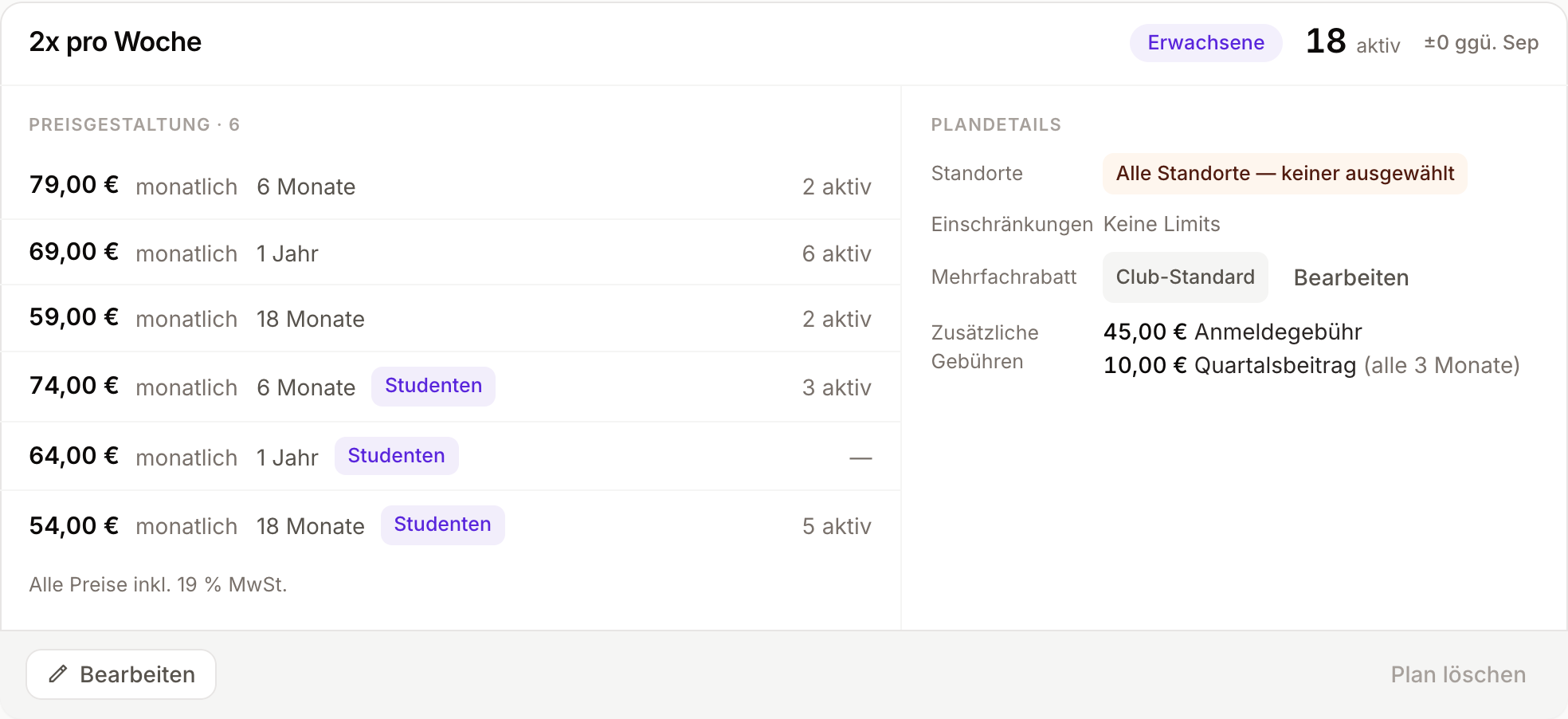
Special prices live inside plans. When you edit a plan, you can add an extra price and assign it to a special price category. That price then appears alongside the regular prices under the same plan -- just with a reduced amount and a special price label.
Take an "Unlimited Adults" plan as an example:
- Regular price: 89.00 per month
- Student discount (special price): 69.00 per month
Both belong to the same plan and the same "Adults" demographic. The member keeps all the behavioral rules of an adult but qualifies for the lower rate.
How it appears during sign-up
In the price selection, the system separates regular prices and special prices into two lists. Regular prices appear first under a "Regular prices" heading, with discounts listed below under "Special prices". This keeps the selection tidy and lets members -- or staff at the front desk -- see at a glance which rates are standard and which are discounted.
On the plan overview in plan settings, prices with a special price are labeled accordingly in the price table, so you can tell at a glance which plans offer reduced rates.
Special prices versus the multi-membership discount
Omoplata has two ways to charge less than the regular price, and they answer different questions. A special price answers "who is this person?". The multi-membership discount answers "how many memberships does this payer already pay for?".
| Special price | Multi-membership discount | |
|---|---|---|
| Based on | A group the member belongs to | The number of active memberships the payer pays for |
| Typical cases | Students, apprentices, police and fire service, members of a partner club, early-bird offers | Siblings, a parent and a child, a couple paying from one account |
| Set up as | A named category plus an own price on every plan and contract term that offers it | One rule for the whole club: tiers by position, as a percentage or a fixed amount, with an optional override per plan |
| Applied by | Choosing the special price when the membership is created (switch on Show special prices) | Omoplata, as a suggestion, as soon as the payer is known |
| Fees | Not affected | Can be discounted as well |
| When prices change | Each special price is updated by hand | Follows the plan price automatically |
| Visible as | A label on the price, with its own count of active members | A hint under the amount when the membership is created |
Which one to use
Use a special price when the reason for the lower price is something about the member that you check once -- a student ID, an apprenticeship contract, a service card -- and when you want that group to have its own clearly named rate. It also fits when the reduced rate is not a simple percentage, for example 69.00 instead of 89.00 on the 12-month contract but no reduction on the monthly one.
Use the multi-membership discount for families. There is nothing to remember at the front desk: the second child's price is suggested automatically, the rule is defined once, and it keeps working when you add plans or change prices.
If you created a "Sibling discount" special price in the past, it keeps working. For new memberships the multi-membership discount is the easier way: you no longer need a sibling price on every plan and contract term, and nobody has to remember to pick it.
Using both together
The two can apply to the same membership. A student whose mother already pays for a sibling gets the student price, and the multi-membership discount is then suggested on top of it. If you don't want the two to add up, overwrite the suggested amount or set the plan's multi-membership discount to No discount.
Special prices versus fees
Don't confuse special prices with fees. A special price lowers the recurring amount a member pays for their plan. A fee, by contrast, is an additional charge on top of the plan price, such as a sign-up or exam fee. The two can coexist: a student can pay the discounted monthly rate and still pay a one-time sign-up fee when they join.